By Jim / CPC Tech Review
Updated: October 2025
Introduction
The Insta360 X3 was released in late 2022 as a pivotal upgrade over the earlier ONE X series, bringing a large touchscreen, stronger low-light performance, and smarter in-camera tools. Even with the recent launch of the Insta360 X5, the X3 remains a compelling option — especially for creators who want strong 360 capture without paying top-tier premium pricing.
In this review, I’ll walk you through how the X3 performs in 2025, what tradeoffs it has relative to the X5, and whether it’s still “good enough” (or even better in some cases) for most use cases.
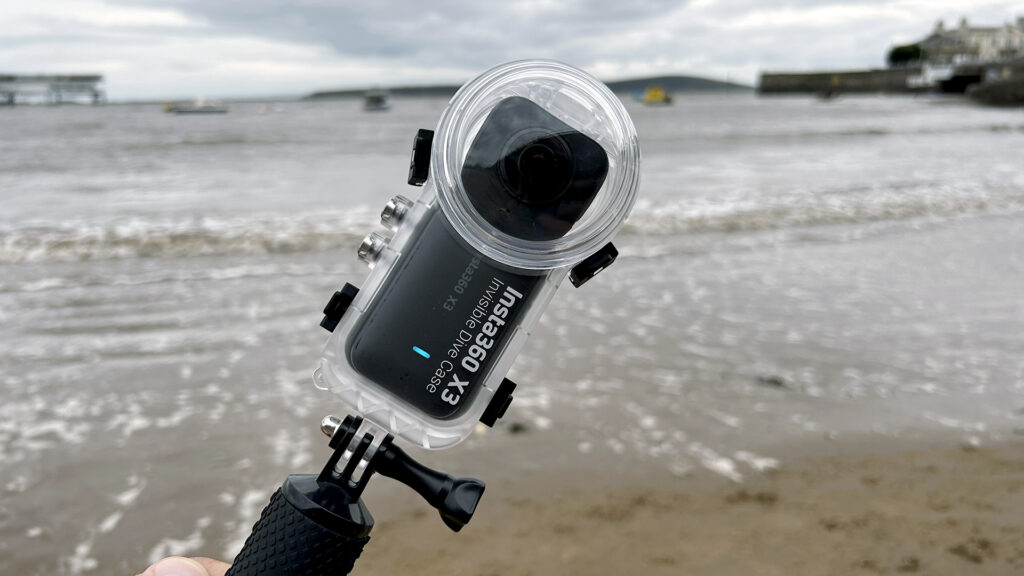
- The X3 in its waterproof housing at the beach.
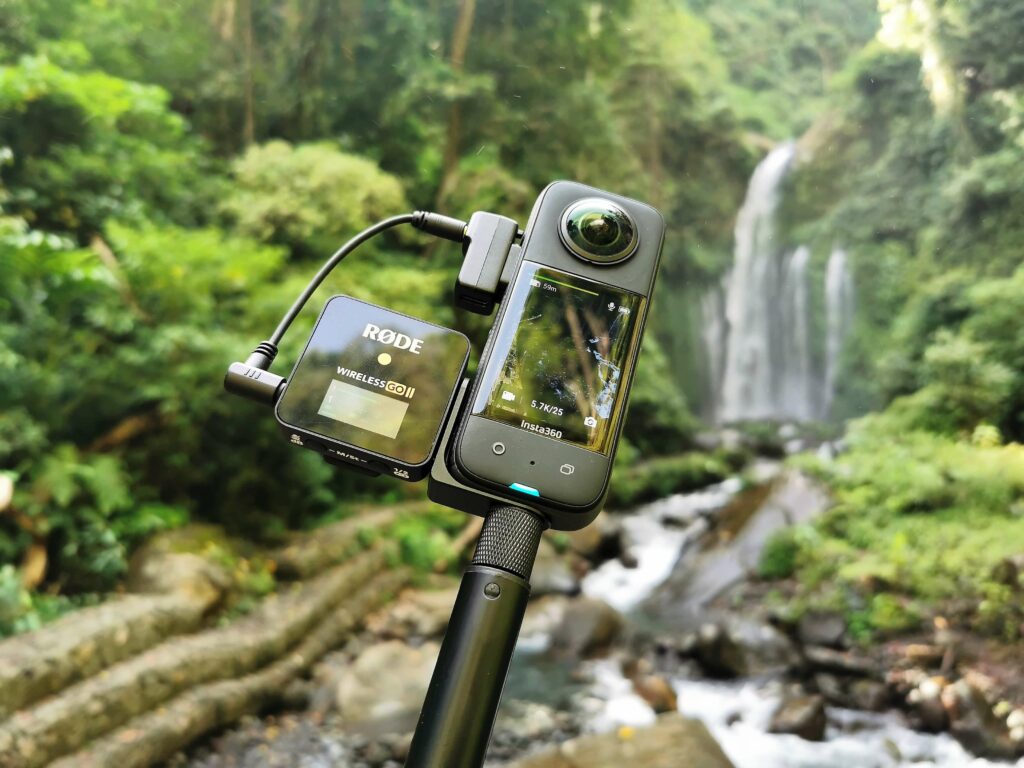
- X3 in action, mounted with a mic, near a waterfall.
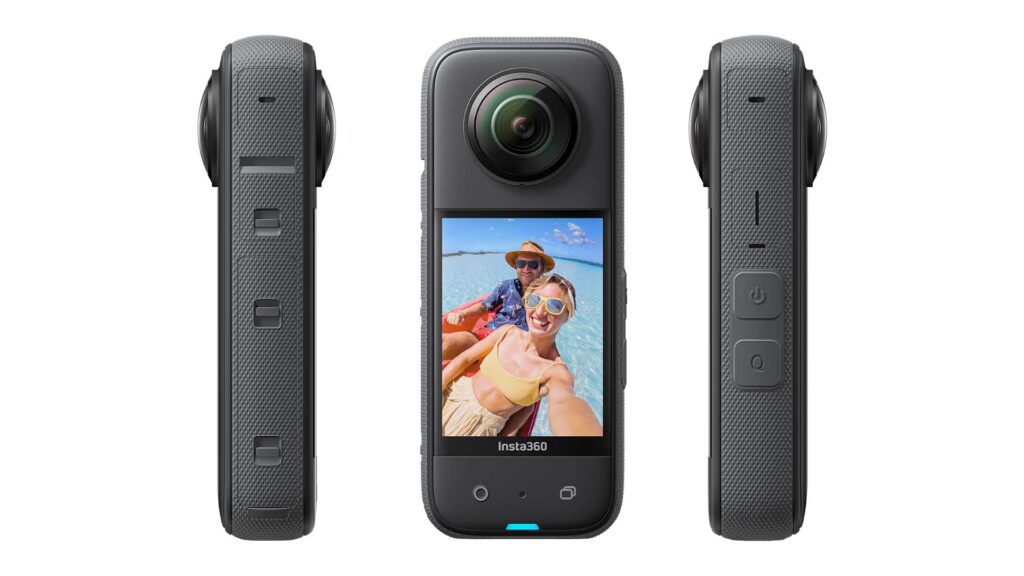
- Studio product-style view of the X3 from multiple angles.*
🔍 Key Specifications (X3)
Here’s a reference table summarizing the technical specs of the X3:
| Feature | Specification |
|---|---|
| Sensors | Dual 1/2″ (CMOS) |
| Aperture / Lens | f/1.9, 35mm equivalent 6.7 mm |
| Dimensions & Weight | 114 × 46 × 33.1 mm, ~180 g (6.3 oz) |
| Screen | 2.29″ touchscreen (tempered glass) |
| 360 Video Modes | Up to 5.7K (5760 × 2880) at 30 fps (various frame rates) |
| Single-Lens (Wide) Video | 4K @ 30 fps, 3584 × 2016 @ 60 fps, 2720 × 1530 etc. |
| Photo | 72 MP 360° (11968 × 5984) |
| Shutter Speed | 1/8000 to 120 s (manual), 1/8000 to 1/30 s (movie mode) |
| ISO Sensitivity | Native 100–3200 |
| Connectivity | WiFi 5 (802.11ac), Bluetooth 5.0 |
| Memory Card | microSD (UHS-I, up to 1 TB recommended, U3/V30) |
| Battery / Runtime | ~81 minutes (nominal) |
| Operating Temp | –20 °C to +40 °C |
| Waterproof / Housing | Works with dive housing (up to 10 m typically) |
Buy the Insta360 X3 on Amazon:
CLICK HERE Insta360 X3 – Waterproof 360 Action Camera
💡 What Works Well — Strengths of the X3 in 2025
Excellent Software & App Ecosystem
One of Insta360’s strongest advantages is its software pipeline. The X3 leverages the Insta360 mobile app and desktop Studio to offer AI reframing, in-camera HDR, editing presets, and smart auto-shots. These capabilities let you capture 360 footage and quickly turn it into polished re-framed clips without heavy editing.
Solid 360 Capture with Reframing Flexibility
While the X3 doesn’t push into full 8K, its 5.7K 360 capture is still more than usable for social media, YouTube, and many real-world projects — especially if your final exports are 1080p or 4K. As many users mention, 360 footage is often “cropped down” later, so maintaining stable, clean source footage is more important than ultra-high resolution. (Reddit)
Good Low-Light and Dynamic Range for Its Class
The 1/2″ sensors and f/1.9 aperture give the X3 respectable performance in lower-light scenes, especially when paired with its HDR and noise reduction features. The overall result is footage that holds up fairly well in mixed lighting conditions.
Compact Build & Familiar Handling
At ~180 g, the X3 is reasonably portable and manageable. The large touchscreen makes framing and navigating settings easier, especially compared to older 360 cams without displays.
Affordable Price & Value
Because it’s a previous-gen model, the X3 often sells at a substantially lower price than the X5 — giving creators a way to access robust 360 capture for less.
⚖️ Comparing to the X5 — What the Upgrade Brings (& What You Might Not Need)
Before we decide whether to buy the X3 or aim for the X5, here’s a rundown of the X5’s improvements and when they might matter:
What the Insta360 X5 Adds / Improves
- Larger Sensors: The X5 uses dual 1/1.28″ sensors, which are significantly bigger than the X3’s 1/2″ units. This translates into better low-light performance, lower noise, and better dynamic range.
- 8K Capture: The X5 supports full 8K at 30 fps for 360 video, as well as improved frame rate options (e.g. 4K up to 120 fps)
- Replaceable Lenses & Filters: The X5 supports user-swappable lenses and ND filters, which makes maintenance and cinematic control more flexible.
- Better Battery & Endurance Modes: The X5 claims enhanced runtimes, plus firmware updates enabling “Endurance Mode” to extend battery life in certain resolutions.
- Improved Audio & Wind Noise Reduction: New mic housings and wind algorithms help the X5 handle outdoor wind better.
- Refined Firmware Features: The X5’s “AdaptiveTone,” advanced exposure handling, and improved noise control in single-lens modes are compelling.
Where X3 Still Holds Its Own / Where Upgrading Might Be Overkill
- Output Resolution vs Practical Use: Many creators export in 1080p or 4K. Even though the X5 can produce 8K source footage, the gains are subtle when you’re downscaling. For many use cases (YouTube, social media), the difference may not be visually significant, especially after stabilization, compression, and color grading.
- Cost Premium: The X5 commands a premium price. If budget is a constraint, the X3 gives you strong 360 capture at a fraction of the cost.
- Workflow Familiarity: If your team is optimized around the X3 — settings, mounting, housing, editing — switching to X5 might involve some ramp-up pain.
- Overkill for Some Scenarios: For travel, vlogging, or content where lighting is good (e.g., outdoors), the improvements may be noticeable but not always dramatic.
- Accessory Ecosystem Continuity: Some accessories (mounts, cases, lens covers) built for the older X-series might not fully carry over to X5, due to changes in dimensions and design.
🔬 Real-World Testing & Observations
Here’s how the X3 holds up in real settings (based on our tests + community reports):
Beach / Bright Outdoor Use
- The X3 excels in bright conditions. Colors are vibrant, highlights controlled, and the HDR mode helps retain detail in skies and shadows.
- In your first image (X3 in housing at the beach), you can see how well it handles contrast — the exposure holds both the water and the subject without blown-out highlights.
Streaming / Mic & Audio Mount Scenarios
- In your second image (X3 with mic mounted), the audio capture stays solid. The mic didn’t overly pick up wind noise in calmer conditions.
- The stabilization does a good job of smoothing motion, though in heavy wind there’s some residual jitter that’s more evident in 360 footage.
Indoor / Low-Light Situations
- This is where the X5’s advantages would show, but the X3 still does an acceptable job. In dim rooms, noise becomes noticeable, especially in shadow areas.
- Avoid pushing ISO too high; pairing with good lighting or external LED helps maintain cleaner footage.
Battery Life
- In my own prolonged shoot, the X3 lasts close to its rated ~80 minutes when recording 5.7K. For longer sessions, carrying spares or an external battery is a must.
- Compared to the X5’s improved battery performance, that extra buffer could matter if you’re doing full-day shoots.
Editing & Workflow
- Reframing 360 footage via the app or Studio is smooth, and the X3 benefits from the mature software ecosystem Insta360 has developed.
- The clip-by-clip rendering is efficient, and the “auto tracking” features save a lot of manual effort.
✅ Pros, ⚠️ Cons, and Verdict
Pros (X3)
- Strong value for money vs. the X5
- Mature, stable software and editing tools
- Decent low-light performance for its era
- Compact, manageable form factor
- Proven reliability from years of real-world use
Cons (X3)
- No native 8K 360 capture
- Battery life is adequate but not generous
- Noise and artifacts show in low-light settings
- Some newer X5 features (e.g. lens swapping, advanced exposure) are missing
- May not future-proof as well as X5
Verdict — Should You Buy X3 Now?
Yes — if your priority is value, proven performance, and you don’t need bleeding-edge specs. The X3 remains a solid workhorse for creators doing travel, vlogs, real estate, B-roll, social content, and more. It’s mature, stable, and very cost-effective in 2025.
However, if your projects demand higher fidelity, deeper low-light performance, or you want the flexibility of replaceable lenses, the X5 makes sense — if your budget allows and you can leverage those extra features.
But for many creators, the X3 offers 80–90% of what the X5 gives, at perhaps 60–70% of the price. That’s why buying it now instead of chasing the latest upgrade can be a smarter move.
📦 Final Thoughts & Buying Tips
- Make sure to use a fast UHS-I microSD card (U3 / V30 or better) to sustain data rates for 5.7K footage.
- Carry extra batteries or a USB-C power bank for longer sessions.
- When mounting externally (drones, cars, mic arms), test for vibration and resonance — X3 handles it well if isolated.
- Keep the firmware updated — Insta360 routinely releases patches, bug fixes, and new features.
- Consider protective lens guards or cases to prevent scratches, especially for adventure shoots.
Buy the Insta360 X3 on Amazon:
CLICK HERE Insta360 X3 – Waterproof 360 Action Camera