Amazon Buy: https://amzn.to/4nsWKf2
Cloner Alliance View Pro Review: The All-in-One Standalone Recorder 📹
Are you a gamer tired of complex PC setups to capture your gameplay? A retro enthusiast looking to digitize old VHS tapes? Or a creator needing a portable monitor and recorder in one? If you answered yes to any of these, the Cloner Alliance View Pro might be the device you’ve been waiting for.
Ready to start recording? Don’t miss out on this all-in-one solution. Click the link below to purchase your Cloner Alliance View Pro!
Buy the Cloner Alliance View Pro Now! CLICK HERE For Best PriceThis little powerhouse is a standalone video recorder, which means no PC is required to capture stunning 1080p 60fps footage. It’s built around a large 7-inch LCD screen, making it a true “see it, capture it” solution. Let’s dive into this full review to see if it’s the right buy for you.
Recommended Accessories (Optional) ⚙️
To get the most out of your View Pro, you’ll need a few items that aren’t included in the box. These are our top picks to complete your setup:
- 🔋 Portable Power: NP-F Style Battery Pack – To make your recorder truly portable, a battery is a must.
- 💽 Fast USB Storage: Samsung USB Flash Drive – A reliable, high-speed drive is crucial for smooth 1080p 60fps recording.
- 💾 High-Capacity SD Card: SanDisk SD Card – A great alternative to a USB drive if you prefer using the SD card slot.
What is the Cloner Alliance View Pro?
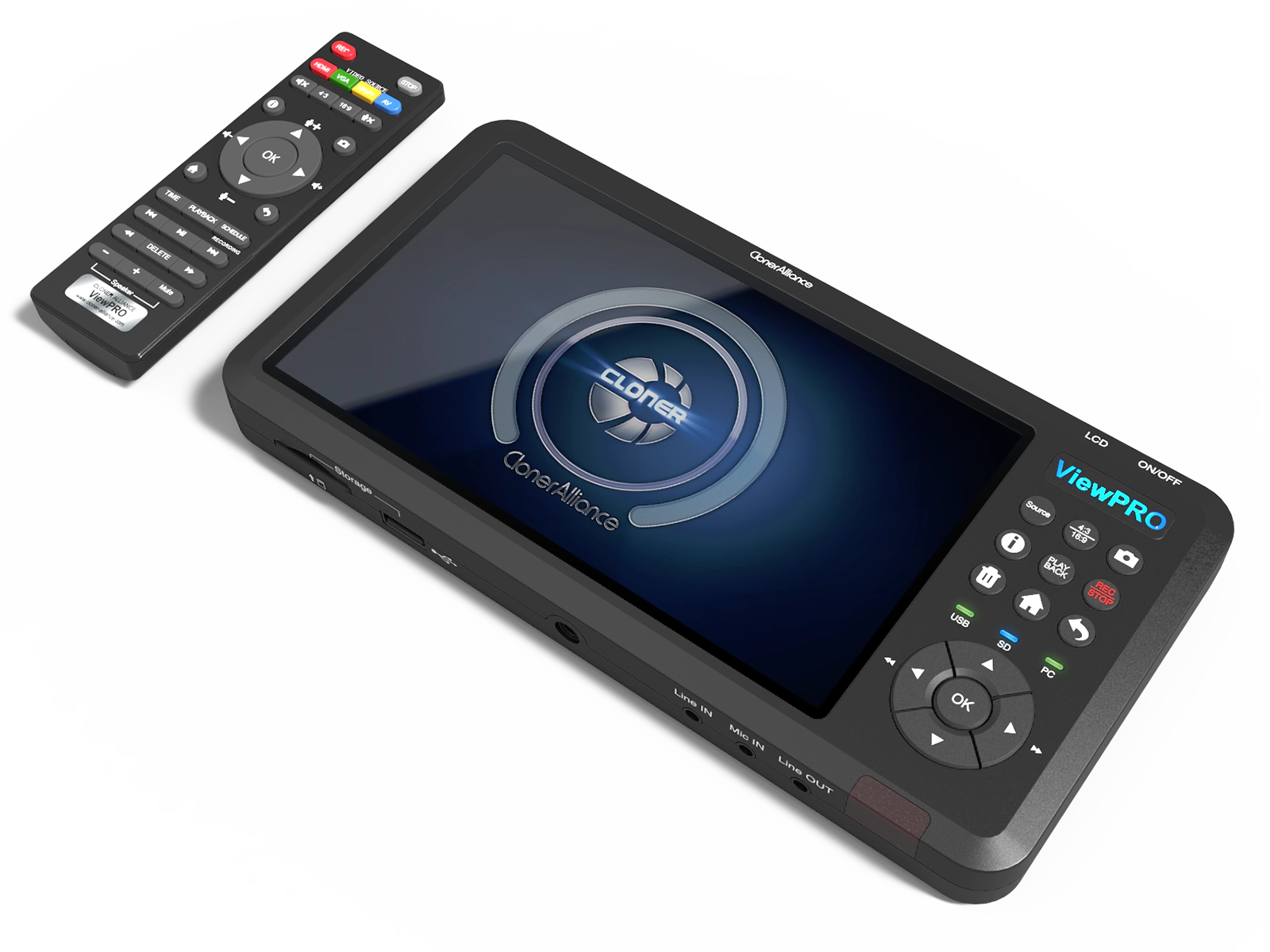
The Cloner Alliance View Pro is a multi-purpose video device. At its core, it’s a standalone video capture box. You feed it a video signal (from a game console, camera, PC, or even an old VCR), and it records the footage directly onto a USB flash drive or external hard drive.
But its real selling point is the built-in 7-inch preview screen. This screen eliminates the need for an external TV or monitor to see what you’re recording, and it also allows you to instantly play back your recorded files. It functions as a recorder, a monitor, and a media player, all in one portable package.
Watch the Video Review 🎬
See the View Pro in action! This video from Couch Potato Cafe, “Ditch the Limitations! Record ANYTHING with the Cloner Alliance View Pro!”, gives a fantastic overview of its capabilities, from unboxing to recording from various sources.
Key Specifications (Specs) 📋
Here’s a quick rundown of the technical details that make the View Pro so capable:
- 🖥️ Display: 7-inch LCD Screen (for preview and playback)
- 🔴 Recording: Standalone 1080p @ 60fps (H.264 MP4)
- 🚀 Input Resolution: Supports up to 4K @ 30fps
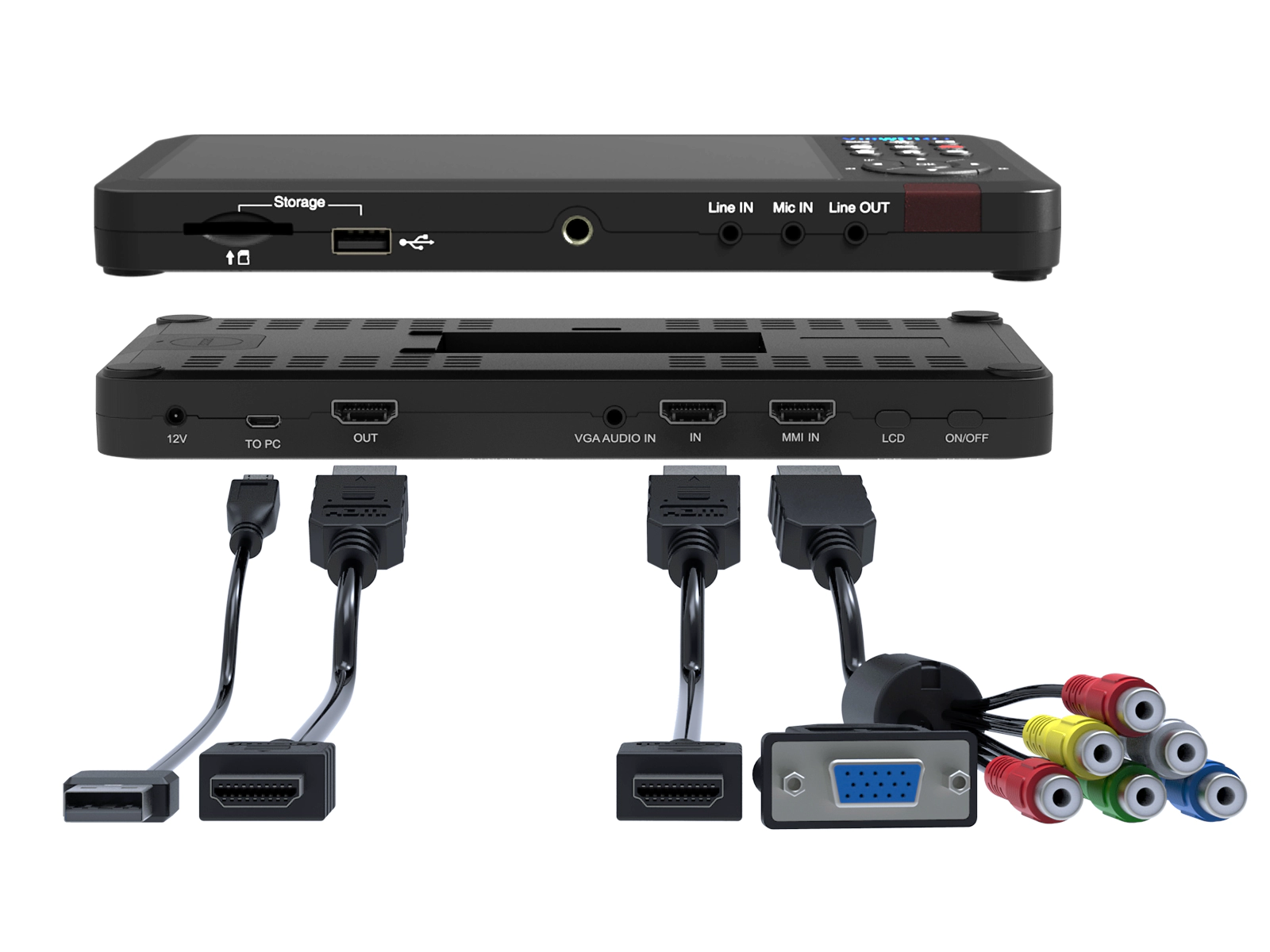
- 🔌 Inputs: HDMI, VGA, AV (Composite), YPbPr (Component)
- 📺 Output: HDMI (Pass-through for zero-latency monitoring)
- 💾 Storage: USB Flash Drive (up to 512GB), External HDD (up to 8TB), SD Card (up to 512GB)
- 🎙️ Audio: 3.5mm Microphone Input (for live commentary), 3.5mm Line In
- ⚡ Power: DC 12V/1A. (Also supports NP-F550/F750/F970 style external batteries for true portability – *battery not included*)
- ⏰ Extra Features: Schedule Recording, One-button Snapshot, Remote Control, PC Mode (for streaming on Windows)
- 📏 Dimensions: 8.7 x 4.3 x 0.8 inches
Why It’s a Good Buy 💰
1. True Standalone Simplicity (No PC!)
This is the View Pro’s biggest strength. You don’t need a powerful computer or complex software like OBS or XSplit just to record. Simply plug in your source, connect your USB drive, and hit the record button. It’s perfect for console gamers (PS5, Xbox, Switch) who want to capture footage without performance hits, or for recording in locations far from a PC.
2. Unmatched Versatility: From 4K to VHS
The array of inputs is incredible. The HDMI input accepts modern 4K signals (downscaling to a crisp 1080p 60fps for recording), but the inclusion of AV and Component inputs is a game-changer for retro enthusiasts. You can finally digitize those old family VHS tapes, Hi8 camcorder footage, or capture gameplay from retro consoles like the PS2 or GameCube with one simple device.
3. The 7-Inch Screen is a Game-Changer
Having a large, clear screen built-in is fantastic. You can frame your shots perfectly, monitor your recording in real-time, and instantly play back clips to see if you got the shot. When paired with an external battery (sold separately), the View Pro becomes a complete, portable recording studio and media player.
4. Live Commentary & Schedule Recording
The 3.5mm mic input allows you to plug in a headset or microphone and record your voice *over* your gameplay or video source, mixing the audio live. This is a huge time-saver for YouTubers and streamers. Furthermore, the schedule recording feature lets you set it and forget it—perfect for capturing a TV show or a long event automatically.
Pros and Cons
What We Liked ✅
- Completely standalone, PC-free recording.
- Large 7-inch LCD for preview and playback.
- Records at a smooth 1080p 60fps.
- Accepts modern 4K and retro (AV/Component) inputs.
- Live commentary via 3.5mm mic input.
- Schedule recording feature is very useful.
- Extremely easy to set up and use.
What We Disliked ❌
- No built-in battery (requires wall power or a separate NP-F battery).
- Storage (USB/SD) is not included.
- Does not record *in* 4K (only accepts 4K *input*).
- PC streaming mode is Windows-only.
Final Verdict: Should You Buy It?
Absolutely. The Cloner Alliance View Pro is a uniquely powerful and flexible device that solves a lot of problems for a lot of people. It bridges the gap between modern and retro, simple and advanced.
If you’re a gamer who just wants to record footage without a PC, it’s a perfect 10. If you’re a family archivist with tapes to digitize, it’s one of the easiest solutions available. If you’re a creator who needs a portable monitor and backup recorder, it’s a brilliant 2-in-1 tool.
While the lack of an included battery is a small inconvenience, its versatility and sheer ease of use make the Cloner Alliance View Pro a fantastic buy and a highly recommended piece of tech. 🏆
Ready to start recording? Don’t miss out on this all-in-one solution. Click the link below to purchase your Cloner Alliance View Pro!
Buy the Cloner Alliance View Pro Now! CLICK HERE For Best Price#ClonerAlliance #PortableRecorder #GameCapture #DigitizeVHS #TechGadgets